


MC Member App
0.00.00 Reviews
App Specs
- Version
- 3.00.1987739448
- Updated On
- License
- Free
- Downloads
- 10,000+
- Developer
- MemberClicks
- Categories
- Events
- Platform
- Android
Screenshots
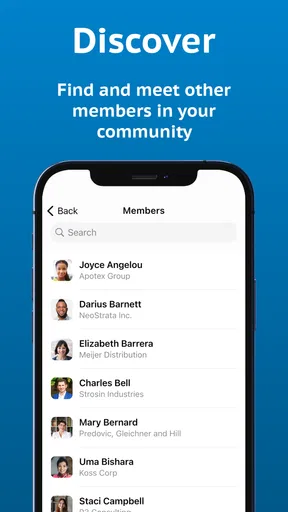
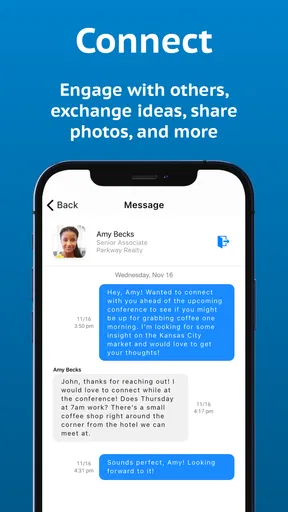
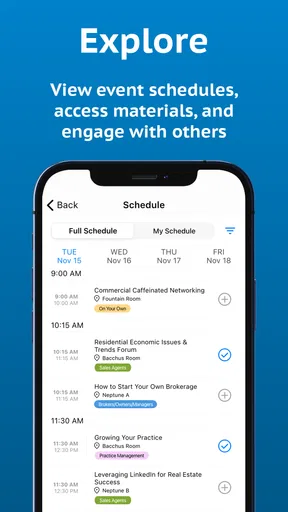
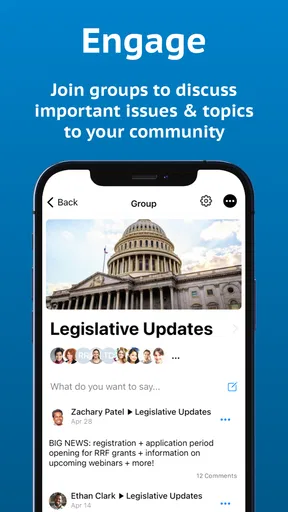
 Analysis by AppCompare
MC Member App is an events-focused mobile app from MemberClicks, designed for people who belong to an organization that uses the MemberClicks platform. I approached it less like a general social network and more like a digital doorway into a member community: useful when your association, club, or professional group has connected its event information and member services to the app.
That distinction matters. The app is free to download, and its age rating is Everyone, but free access does not automatically mean that every event or organization service is available to every person. In practice, the value depends on whether your organization uses MemberClicks and what it has made available to members. If you already have that connection, this app can be a convenient place to keep association activity closer at hand. If you do not, it is unlikely to become useful simply because it costs nothing.
How MC Member App fits into an event-based membership routine
The app belongs to the Events category, although its purpose is more specific than a broad event-discovery tool. I would think of it as a companion for an existing membership relationship rather than an app for finding concerts, public festivals, or local activities. The developer is MemberClicks, and the store summary describes it as the official MC Member App.
That official-companion role shapes the whole experience. A general calendar app starts with your personal schedule. A social platform starts with conversations and posts. An event marketplace starts with public listings and ticket purchases. This app starts with the organization you are already connected to. That can be a strength because it keeps the experience relevant, but it also means the app is not especially useful as a standalone tool.
In a realistic everyday situation, imagine that I belong to a professional association preparing for a conference. Instead of searching through old emails for the event details, I could open the member app and use the organization’s mobile presence as my starting point. I would still need the association to support the relevant information, but the basic advantage is clear: the app can put member-oriented event access in a place that is easier to check while traveling, between meetings, or during the event itself.
I found the most important question is not “What does this app do for everyone?” but “Does my organization use it in a meaningful way?” That is the question I would answer before installing. The name and official positioning suggest a focused tool, not a universal event planner.
Free access is useful, but it is not the same as universal access
There is no purchase price attached to the app: it is free. That makes trying it low-risk, especially if your organization has specifically told members to use it. You are not making a financial commitment just to see whether it fits your event routine.
Worth Reading Before You Choose

EA SPORTS FC Mobile 26 Is a Bigger Football Game, but It Takes Time

Flipboard Shows What News Apps Must Do Beyond the Feed

Switching to Android Auto Means Rethinking Your Driving Routine

Google Calendar Makes a Crowded Week Easier to Manage

Ludo King Makes the Most of the Minutes Between Plans

Baby Panda World Brings Quick Play to Modern Phones, but Its Game Library Feels Busy
Still, I would separate the cost of the app from the cost of belonging to the organization behind it. The app itself being free does not tell me whether an association, conference, membership, or event has its own fees. Those are separate decisions managed by the relevant organization. For that reason, I see the app as a free access point, not as proof that every service reached through it is free.
This is also why I would not judge its value by comparing it with paid event-planning software. The comparison is not really about replacing a complete planning suite. It is about whether a member gets a simpler route into information and activities already connected to their organization. If that route saves time, free access is a meaningful benefit. If your group does not use the platform, the zero price does not create much practical value.
What the app can be good at in the right membership setting
The strongest potential use is reducing the distance between membership and events. An organization may communicate through several channels at once: email, a website, printed notices, and social media. A dedicated member app can give users one more focused place to begin, rather than forcing them to remember which channel contains which detail.
That can be especially helpful during a busy event period. When I am away from my desk, I prefer checking one relevant app over opening a long email thread or searching a website that also contains public information, donation pages, news, and general content. A member-focused app has a narrower purpose, which can make the routine feel less scattered.
Another useful insight is that the app’s value may increase for people who attend events repeatedly, not just once. A single attendee might be satisfied with an email confirmation and a browser bookmark. A regular member, however, has more reason to keep a dedicated entry point available. The more often I need to check organization-related activity, the more I can justify keeping the app on my phone.
I would also consider it useful for people who do not want their membership experience tied entirely to a desktop browser. A mobile app is naturally better suited to quick checks while commuting, waiting for a session, or moving around a venue. That does not make it a replacement for every website function, but it can be a more practical first stop for mobile-oriented members.
Three practical habits that make the app more worthwhile
My first tip is to install it only after confirming that your organization actually supports it. Search results and app names can make a member app look broadly useful, but this one is tied to the MemberClicks ecosystem. A quick message to your association administrator can save the frustration of opening an app that has no relevant connection for you.
My second tip is to treat it as a companion to your normal event preparation, not your only backup. Before leaving for an important gathering, I would still keep essential details available through the organization’s established communication method. That is not a criticism of this particular app; it is sensible planning whenever event information is managed by an organization and can change outside your direct control.
My third tip is to use the app as a check-in point during the event rather than waiting until the last minute. If your group has made useful member content available there, opening it before travel can reveal whether the app is genuinely helping your routine. You can then decide whether it deserves a permanent place on your home screen or only occasional use.
A fourth trade-off is worth noting: a dedicated app can reduce searching, but it also creates another place to remember. If your organization already sends perfectly clear updates by email, adding an app may feel like duplication. I would keep both channels only if the app offers a practical advantage, such as easier mobile access or a more focused member experience.
Where the usual alternatives may be better
For a public event that you are still discovering, a general events platform is usually the better choice. Those services are built around browsing, location-based discovery, categories, and public listings. MC Member App is aimed at an existing member relationship, so it is not the tool I would choose when I simply want to see what is happening in my city.
For personal scheduling, the calendar already built into a phone may also be more flexible. A calendar app is designed to combine work appointments, family plans, travel, and reminders in one timeline. The member app has a narrower organizational purpose. I would use the calendar to protect my time and the member app to stay connected with the organization’s event context, assuming that context is available through my membership.
Email can remain the better alternative for occasional participants. If I attend one event a year and receive clear instructions in my inbox, installing another app may not improve anything. On the other hand, people who participate regularly may appreciate having a dedicated place to return to. The right choice depends on frequency and convenience, not on the word “official” alone.
A full event-management platform is another different category. Organizers who need advanced planning, detailed attendee administration, or broad operational control should not assume that a member-facing app replaces those systems. From my perspective, this app is most sensibly evaluated as the mobile side of a membership experience, not as a complete event-production workstation.
Compatibility and the practical installation decision
The app was released on January 9, 2020, and its current version is 3.00.1987739448. It requires Android 7.0 or later, so anyone using an older Android device should check compatibility before planning around it. That requirement is reasonably accessible for many users, but it still matters for older phones kept as backup devices or used by members who avoid frequent upgrades.
The store lists more than ten thousand installs, which places it in the category of a focused member utility rather than a mass-market consumer platform. I would not interpret that figure as a quality score. Instead, it reinforces the idea that the app serves a specific audience: members of organizations using MemberClicks, not everyone searching for an event app.
The Everyone content rating makes it approachable from an age-classification standpoint. That does not tell me whether the content of a particular organization’s event program will suit every person, but it does make the app itself feel broadly accessible for general member use.
Before installing, I would check three things: whether my organization has adopted the app, whether my Android device meets the requirement, and whether I actually need a mobile member channel. Those checks are more useful than judging the app by its download price alone.
Who is most likely to get real value from it
I would recommend MC Member App first to active members of associations, clubs, and other organizations that use MemberClicks for their member-facing event experience. It makes the most sense for people who attend recurring activities, travel to organization events, or dislike digging through old messages for basic event context.
It may also suit volunteers and committee participants who need to stay close to an organization’s activity while away from a desk. The benefit here is not that the app magically organizes every responsibility. The benefit is having a mobile-oriented connection to the organization’s member environment when that environment has been configured to support the user’s needs.
People who attend only occasional public events should be more selective. If the organization provides everything clearly through a website or email, the app may add little. Likewise, someone looking for a broad event-discovery service should skip it and choose a platform designed for public browsing.
I would also hesitate to recommend it to anyone expecting a universal replacement for their calendar, inbox, or event ticketing tools. Its focused purpose is precisely what can make it convenient for the right member and limited for everyone else.
My final recommendation after weighing the trade-offs
The free price makes MC Member App worth trying when your organization actively supports it. There is little financial risk in testing a dedicated member channel, and the app can be genuinely convenient for recurring event participation. Its best quality is focus: it is built around the relationship between a member and an organization rather than around the entire public events market.
My recommendation becomes much weaker if you are not connected to a MemberClicks-powered organization. In that situation, the app’s official status does not translate into personal usefulness. I would also skip it if your event needs are already handled smoothly by email and a personal calendar, especially if you attend only rarely.
Overall, I see this as a practical niche app rather than an essential download for everyone. Its value is free to access, but its usefulness is conditional on the organization behind it. For an active member who wants a more convenient mobile route into association events, MC Member App is a sensible tool to try. For public event discovery, personal scheduling, or advanced event management, I would choose a more specialized alternative instead.
Pros
- Quick access to MC member benefits and account information.
- Convenient digital membership card available whenever you need it.
- Helps users keep membership details organized in one place.
- Useful for checking updates without visiting a physical location.
- Simple mobile access can save time during member-related tasks.
Cons
- Some features may require an active MC membership to use.
- Account setup can be inconvenient if membership details are unavailable.
- App usefulness may vary depending on your location and MC services.
- Notifications may become unnecessary if you rarely use member benefits.
- Performance can depend on your device
- app version
- and internet connection.
FAQs for MC Member App
What is the MC Member App used for?
The MC Member App is designed to give members convenient access to their organization’s services, information, and account features from a mobile device. Depending on the organization using it, the app may allow you to view membership details, receive announcements, access digital resources, manage profile information, or contact support. Available tools can vary, so the exact experience depends on your membership and the app’s configuration.
Who can use the MC Member App, and is registration required?
The app is generally intended for registered members of the organization or community connected with MC Member. In most cases, you need valid membership credentials or an invitation before you can use the main features. Some sections may be visible without signing in, but account-based functions normally require registration or login. If your credentials do not work, you may need to contact the organization’s administrator rather than create a separate public account.
Is the MC Member App free to download and use?
The MC Member App may be available to download without an upfront charge, but access to certain services can depend on your membership status or the policies of the organization providing the app. Downloading the application does not necessarily mean every feature is free. Before installing, check the Google Play Store or Apple App Store listing for current pricing, subscriptions, in-app purchases, and any membership fees that may apply.
What information and permissions does the MC Member App require?
The permissions requested by the MC Member App can depend on the device, operating system, and features enabled by the organization. You may be asked to provide account details such as your name, email address, membership information, or contact details. Optional permissions, including notifications, camera, storage, or location, should be reviewed carefully. You can usually manage these permissions later through your Android or iOS settings.
What should I do if the MC Member App is not working or I cannot log in?
If the MC Member App does not open, freezes, or rejects your login, first check your internet connection and confirm that you are using the correct credentials. Updating the app and your phone’s operating system may also resolve compatibility problems. You can try restarting the device or reinstalling the app, but avoid deleting it if you need locally stored information. For account, membership, or server-related issues, contact the organization’s official support team.


